
The Technology of TactileAudio
This is a short introduction to the choices for the technology used in the TactileAudio project.
Separating the CPU from the Capacitive Sensors
Earlier systems, such as the BareConductive TouchBoard, integrated capacitive sensors on the CPU board itself. While compact and economical, this limited the geometry of touch-sensitive projects.
The problem is that the wires that connected the TouchBoard to its sensors (e.g. foil, conductive thread, bananas) are themselves capacitive; that is, touching the wire had almost the same effect as touching the sensor. A wire (for example) couldn't be run from a glove on your hand up your sleeve to a TouchBoard in a jacket pocket, because the capacitance of the wire against your skin (even through an insulated wire) was so strong that it overwhelmed whatever was going on at the sensor in your glove.
The first minute of this video demonstrates this effect.
The Teensy 4.1 Microcontroller
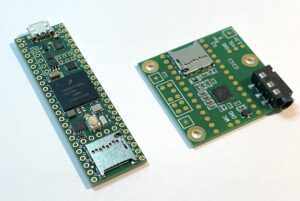
For the CPU, we selected the Teensy 4.1 microcontroller (left in photo) from PJRC for our central CPU system. It is a very powerful little device: it sports a 600 MHz CPU and a megabyte of program memory—enough speed and capacity for very complex tasks. (For perspective, this is roughly the power and memory of a 2005 Windows PC.)
Combined with its Audio Shield (right in photo), a specialized audio-processing device, it can play four full-fidelity stereo sound tracks simultaneously.
The Gemma-M0
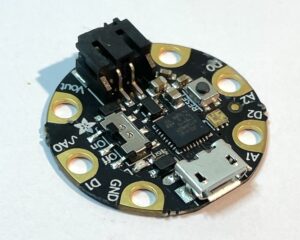
For our touch/proximity sensor, we selected the Gemma-M0 from Adafruit.
Touch/proximity sensors use electrical capacitance to sense nearby objects. But capacitive sensors have a problem: physics. First, the electrical signals being sensed are tiny, measured nanoamps (billionths of an amp) of current. The detectors must be very sensitive indeed.
And second, everything has capacitance: the Gemma, the wires, the sensor you’re trying to put in your project, your project, your body … everything. This means (for example) that if you have a wearable capacitance detector in your shirt pocket connected by a wire to a sensor on your wrist, the wire from your pocket to your wrist will sense the skin under your clothing and overwhelm the touch sensor on your wrist.
To solve this, the TactileAudio project uses the Gemma-M0, which is placed in close proximity to the touch/proximity sensor so that it can reliably measure the capacitance (usually less than a dozen centimeters). The Gemma-M0 then translates the tiny capacitance signal it measures into a strong voltage which can be sent reliably over long distances to the Teensy 4.1 for processing.
A simple analogy is that the Gemma-M0 acts as a pre-amp. By amplifying the signal right at the source, it can be reliably transmitted long distances to the central microcontroller for processing.
No Programming Required
To make TactileAudio accessible to non-technical people, we adopted a no-programming approach.
A web application, the TactileAudio Configurator, allows you to configure every feature and option of the TactileAudio system. When your configuration is ready, it writes the C++ computer program for you, and you simply copy-and-paste a small computer program (called a “sketch”) into the Arduino app.
This completely transforms the creative experience.
"Under the covers," the TactileAudio software “library” provides an API (application programming interface) for each feature of the TactileAudio system . Everything the TactileAudio system knows how to do is implemented by this software library; the TactileAudio Configurator just has to tell the library which API calls to make.
More importantly, users don’t have to do any programming at all.